
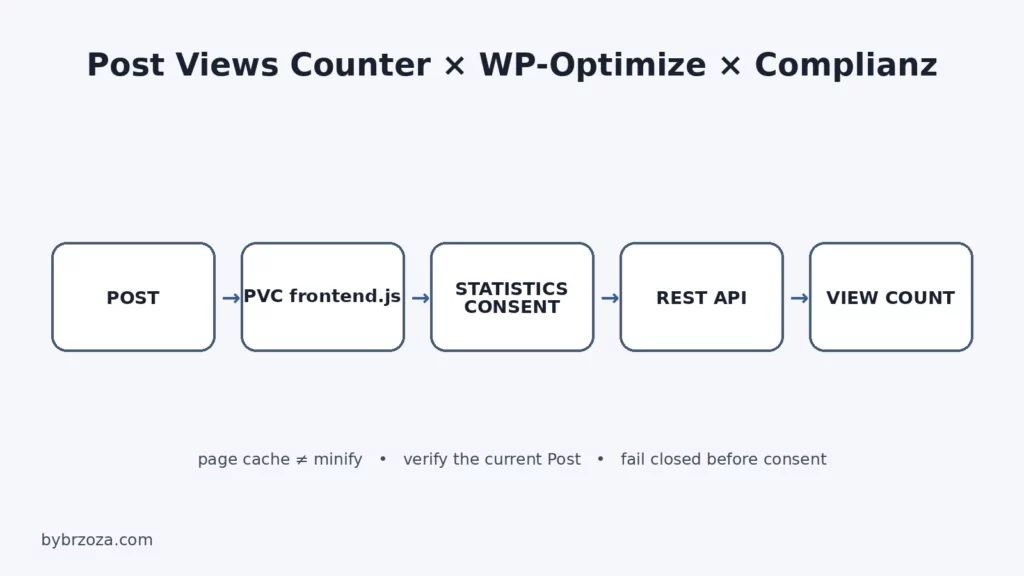
Why HTTP 200 did not prove the right post was being counted
This started like a typical “cache problem”. Post Views Counter was using REST API mode, the endpoint responded, yet the counter on the post I was testing did not behave reliably. The useful breakthrough came from separating four layers that are easy to mix together: page caching, JavaScript minification, current-post context, and statistics consent.
This is the exact bybrzoza.com case from 2 September 2026. I am not claiming that WP-Optimize always breaks Post Views Counter, or that every site should classify the counter in the same way. The value here is the diagnostic path and the runtime result confirmed on this installation.
Environment used for the test
| Component | Version during the incident |
|---|---|
| WordPress | 7.1 |
| PHP | 8.5.7 |
| Post Views Counter | 1.7.15 |
| WP-Optimize | 4.6.1 |
| Complianz | 7.5.4 |
| Polylang | 3.8.7 |
Before copying any path, check the files loaded by your own installed version. In this setup the relevant PVC asset was post-views-counter/js/frontend.js.
1. First establish who owns the page cache
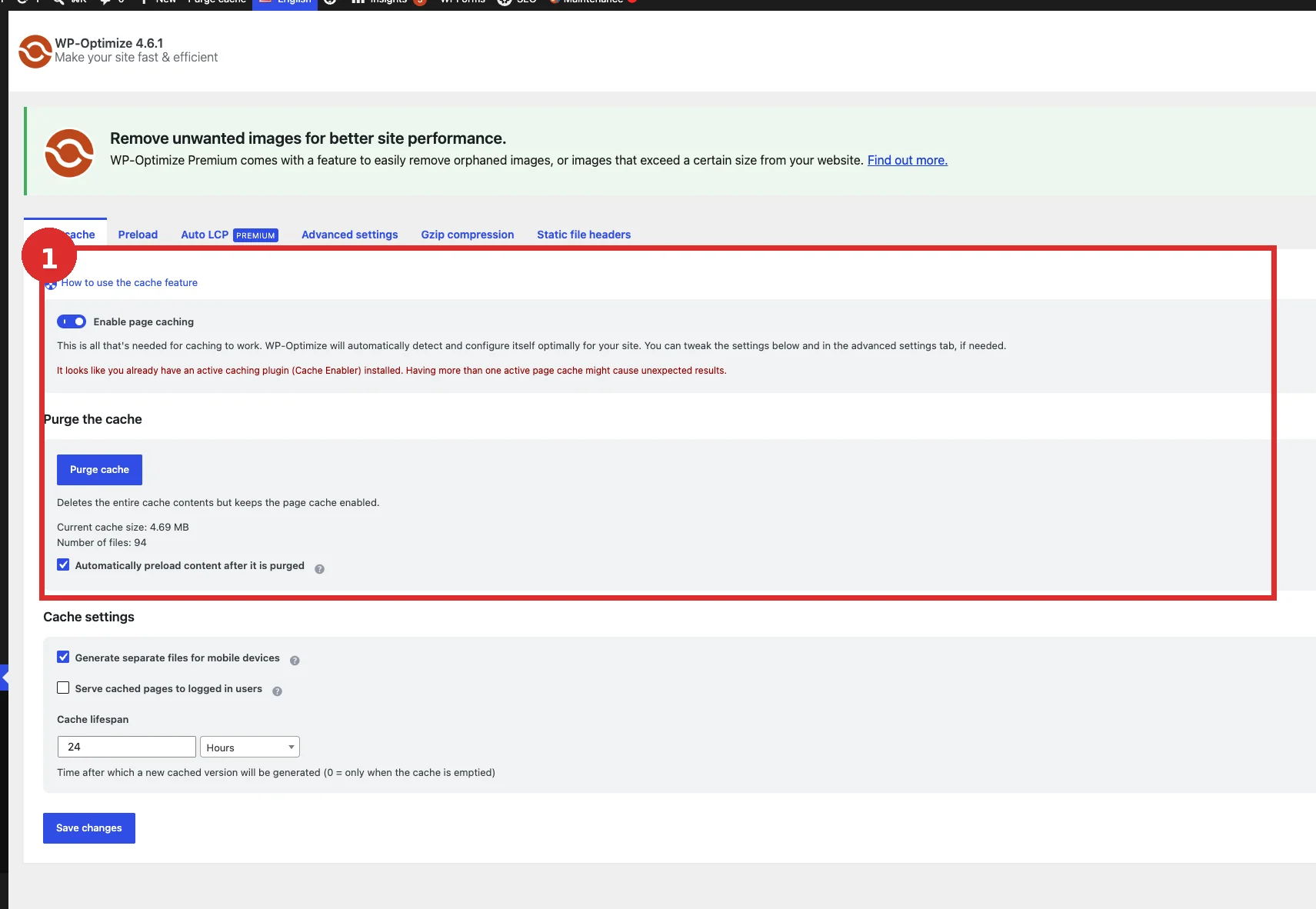
The audit found a genuine configuration problem before I even reached PVC: WP-Optimize Page Cache and Cache Enabler were both active. WP-Optimize displayed its own warning about the second page-cache plugin. I disabled Cache Enabler, kept WP-Optimize as the single page-cache owner, purged the cache and ran an anonymous smoke test.
That removed a real source of noise. It does not prove that duplicate page caching caused the later Post Views Counter context issue. Page Cache and Minify are separate features and I treated them separately from that point.
2. A REST 200 is not enough: verify the post ID and initiator
Post Views Counter supports multiple counting modes; the final setup here uses REST API. During troubleshooting I also made a procedural mistake that is worth documenting: one test was performed on a Page while the relevant counting scope was Posts. That test could not validate the real path.
On an actual published post the PVC endpoint could return HTTP 200. I therefore checked pvcArgsFrontend, its postID, the request URL and the JavaScript initiator in DevTools.
While PVC’s frontend code was processed inside a merged/minified WP-Optimize bundle, the request could carry stale or wrong post context. Transport looked healthy, but the visible counter was not reliably tied to the post I had open.
3. Exclude one PVC asset instead of disabling Minify
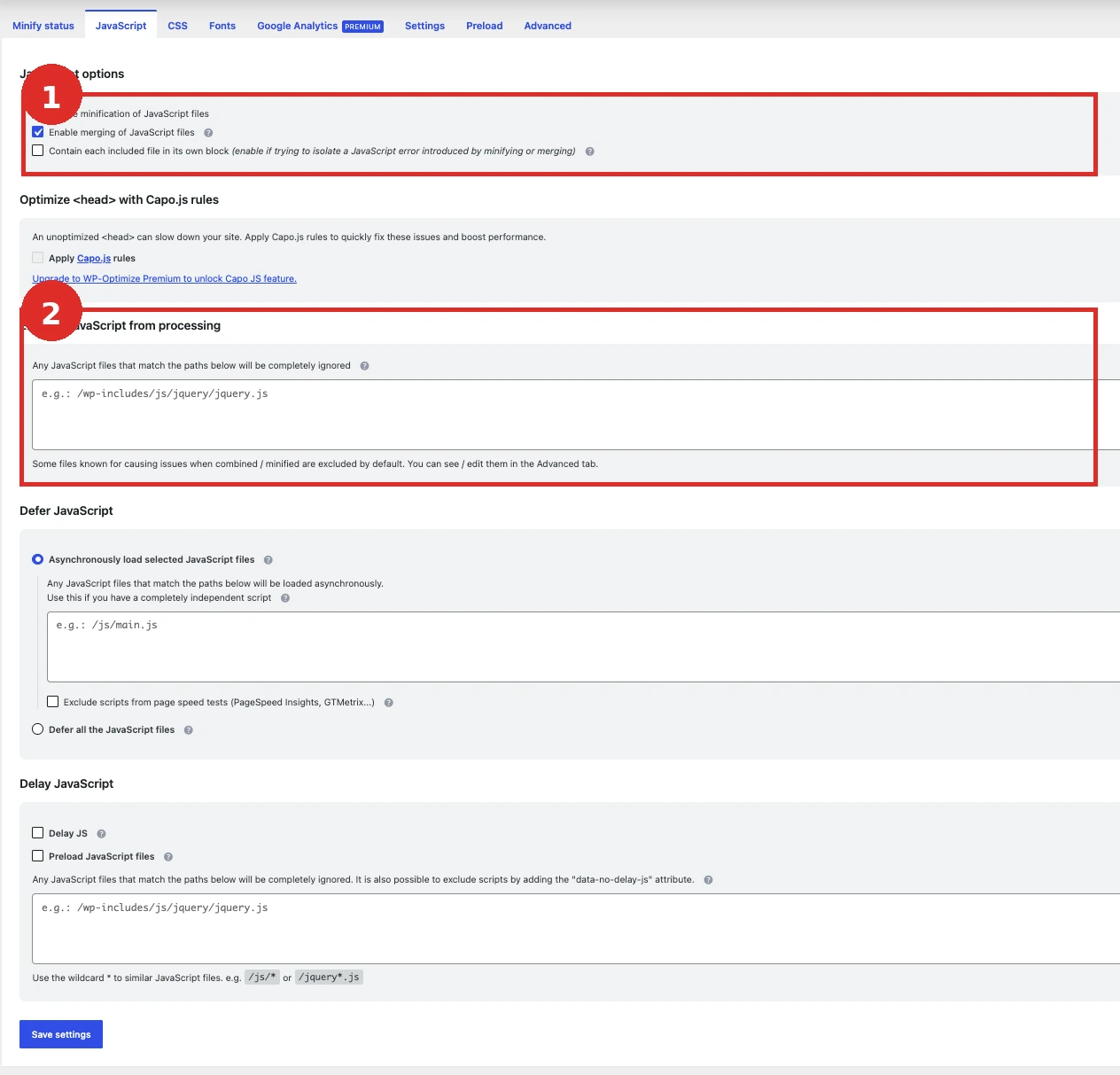
JavaScript minification and merging were both enabled in WP-Optimize. Rather than turning off the whole optimization layer, I used:
WP-Optimize → Minify → JavaScript → Exclude JavaScript from processingFor the installed PVC version, the specific path fragment was:
post-views-counter/js/frontend.jsWP-Optimize’s current documentation still states that scripts listed there are removed from both minification and merging. After saving the exclusion I reset the Minify/cache files and repeated the test anonymously.
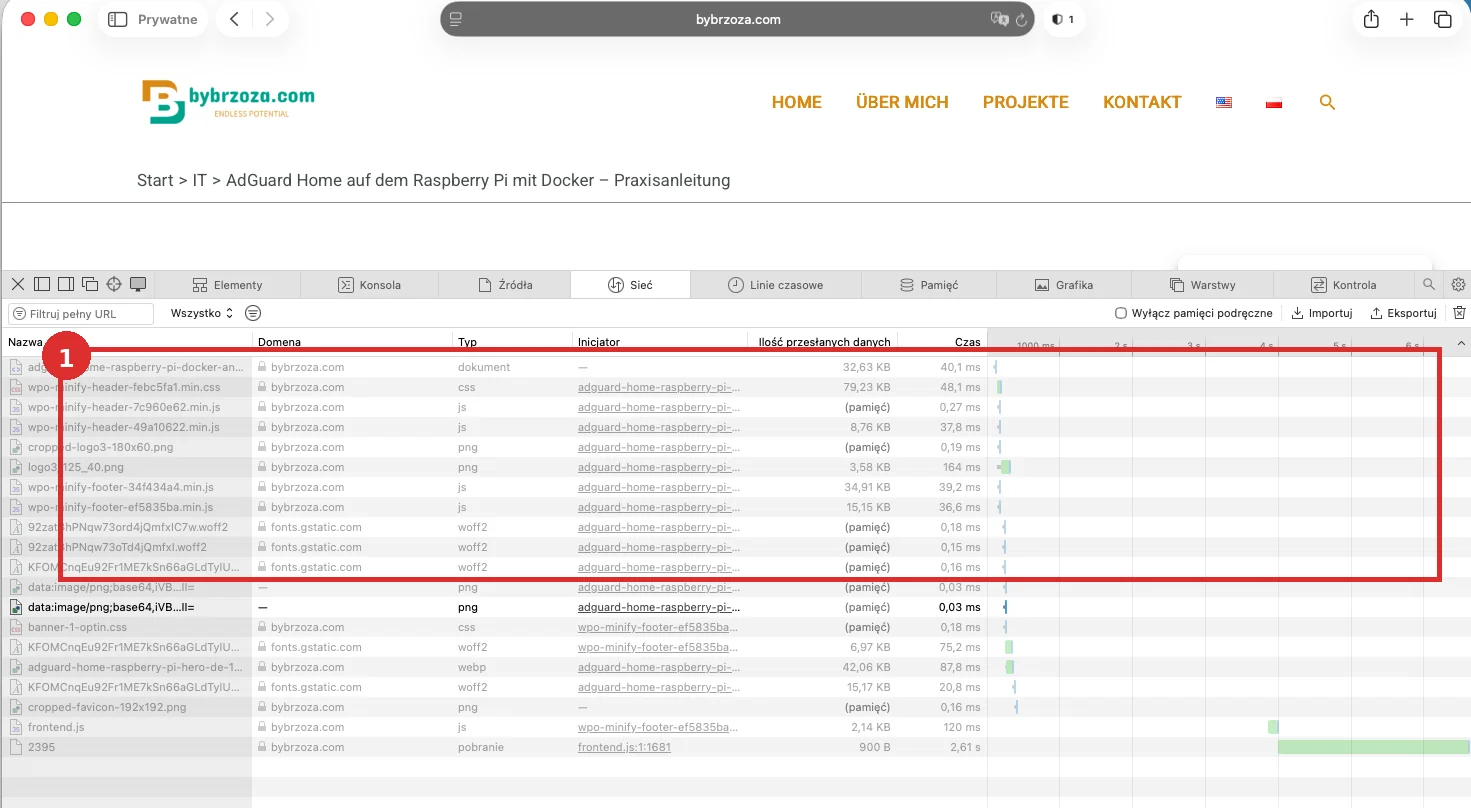
After that, frontend.js loaded separately. DevTools showed the request initiated by the expected file with the correct current post ID, and both the visible and backend counters incremented consistently.
4. Gate the now-working counter behind Statistics consent
On this site I treat PVC as statistics functionality. That is a configuration decision for this installation, not universal legal advice.
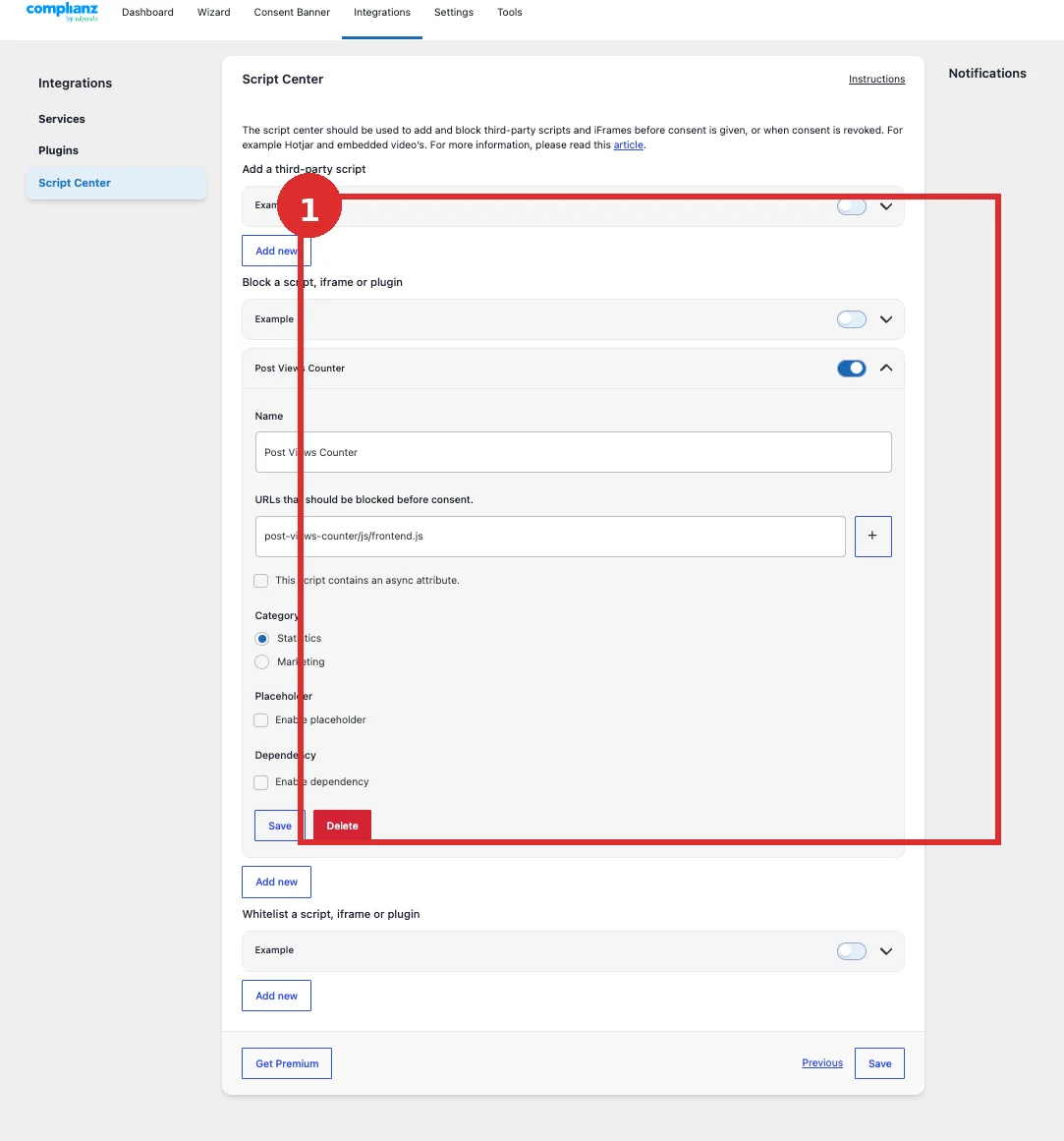
In Complianz → Integrations → Script Center I created a block rule:
- Name: Post Views Counter
- Action: Block a script, iframe or plugin
- URL/script:
post-views-counter/js/frontend.js - Category: Statistics
Complianz’s documentation recommends using a sufficiently specific URL or script identifier. An overly broad match can block unrelated code.
5. Consent test matrix: before choice, Deny and Accept
I verified this in a fresh private browser session on a real published post. The browser runtime mattered more than the fact that the backend settings looked correct.
| State | PVC request | pvc_visits[0] | Count |
|---|---|---|---|
| Before choice | no | no | no PVC increment |
| Deny | no | no | no PVC increment |
| Accept | yes | yes | increment confirmed |
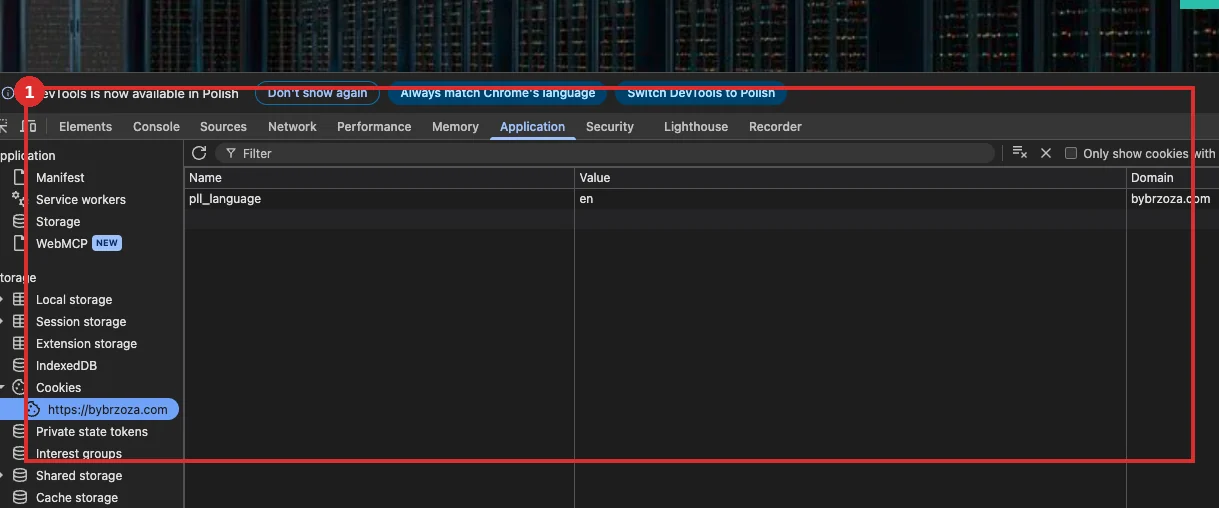

pvc_visits[0] appears. Its value is permanently redacted in this screenshot.6. Document the custom service and cookie in Complianz
Script Center controls execution, but I also wanted the Cookie Policy to describe what I could actually observe in the browser. I therefore maintained a custom service and cookie entry.
| Field | Value |
|---|---|
| Service | Post Views Counter |
| Service type | website statistics |
| Data shared | No |
| Cookie | pvc_visits[0] |
| Expiration | 1 day |
| Purpose | Statistics |
| CookieDatabase sync | Off — custom entry |
The English function text is: “Store visited posts and session information to prevent duplicate page view counting”. I maintained equivalent German and Polish descriptions manually.
7. A separate problem: the custom Usage sentence stayed English
There are two different Complianz/Polylang issues in this story. I already documented the earlier synchronized-document timing problem separately: Complianz + Polylang: Cookie Policy stays English — fix.
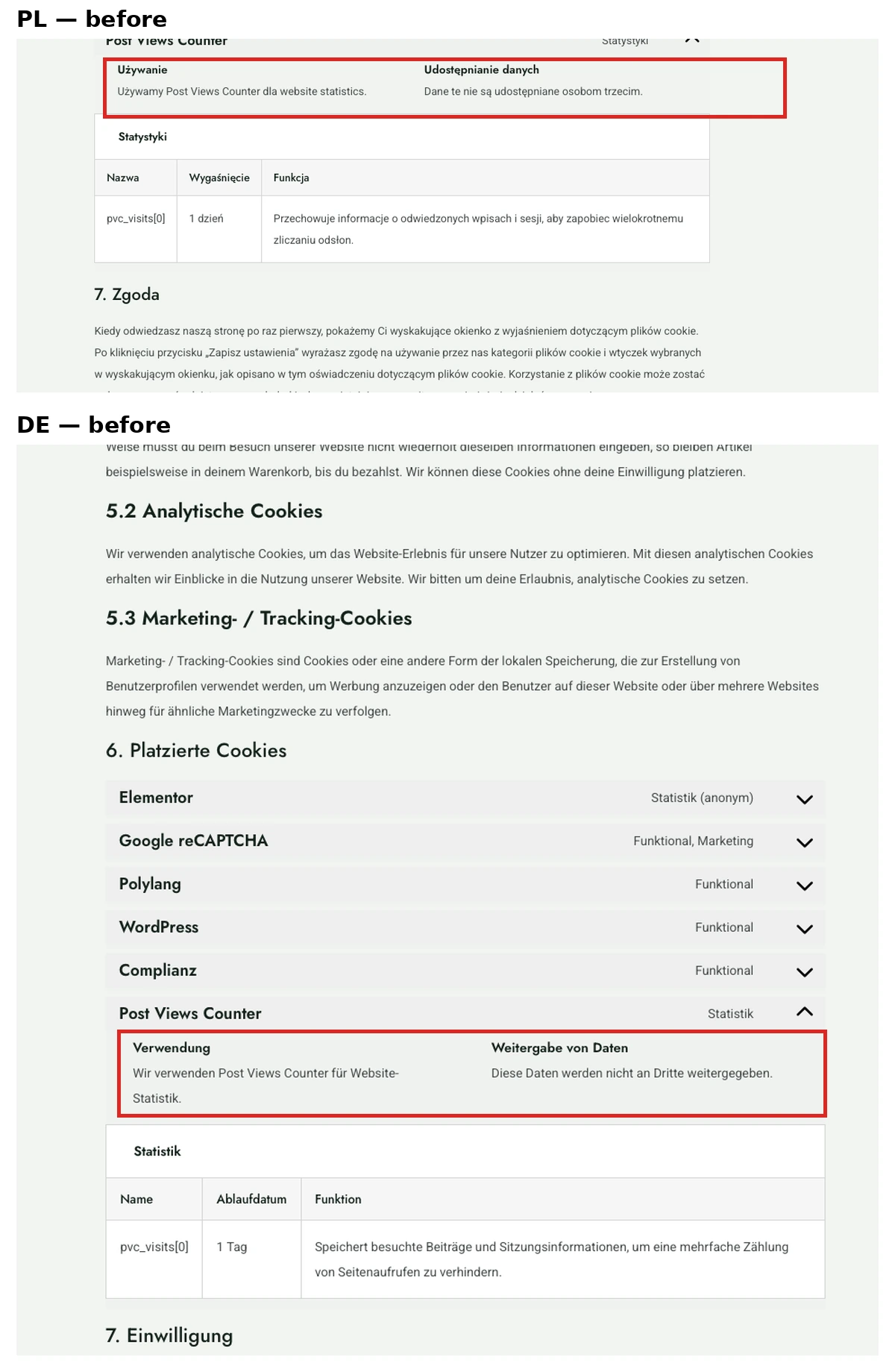
Here the main legal document was already correct. Only the generated Usage sentence for the custom PVC service remained mixed-language:
- DE:
Wir verwenden Post Views Counter für website statistics. - PL:
Używamy Post Views Counter dla website statistics.
Maintaining the Service Type manually and adding Polylang String Translations did not change this particular custom-service fragment.
8. A narrow workaround with cmplz_document_html
I did not edit Complianz vendor files. The existing MU-plugin 0.1.0 was extended to 0.2.0 with a separate filter on the final document HTML. The new part applies only to the synchronized EU Cookie Policy, only to pl_PL and de_DE, only while Complianz is >=7.5.4 and <8.0.0. English is untouched.
function bybrzoza_cmplz_localize_pvc_usage( string $html, string $type, int $post_id ): string {
    if ( $html === '' || is_admin() || wp_doing_ajax() || wp_doing_cron() ||
        ( defined( 'REST_REQUEST' ) && REST_REQUEST ) ) {
        return $html;
    }

    if ( ! function_exists( 'pll_current_language' ) || ! class_exists( 'COMPLIANZ' ) ) {
        return $html;
    }

    if ( ! defined( 'CMPLZ_VERSION' ) || ! isset( COMPLIANZ::$document ) ||
        ! method_exists( COMPLIANZ::$document, 'get_document_data' ) ) {
        return $html;
    }

    $cmplz_version = strtok( (string) CMPLZ_VERSION, '#' );
    if ( version_compare( $cmplz_version, '7.5.4', '<' ) ||
        version_compare( $cmplz_version, '8.0.0', '>=' ) ) {
        return $html;
    }

    $pll_locale = pll_current_language( 'locale' );
    $wp_locale  = get_locale();
    if ( ! is_string( $pll_locale ) || $pll_locale === '' || $pll_locale !== $wp_locale ) {
        return $html;
    }

    if ( ! in_array( $wp_locale, array( 'pl_PL', 'de_DE' ), true ) ) {
        return $html;
    }

    $document_data = COMPLIANZ::$document->get_document_data( $post_id );
    if ( ! is_array( $document_data ) || ( $document_data['type'] ?? '' ) !== 'cookie-statement' ) {
        return $html;
    }

    $region = $document_data['region'] ?? false;
    if ( ! $region && function_exists( 'cmplz_get_region_from_legacy_type' ) ) {
        $region = cmplz_get_region_from_legacy_type( 'cookie-statement' );
    }
    if ( $region !== 'eu' ) {
        return $html;
    }

    $replacements = array(
        'de_DE' => array(
            'old' => 'Wir verwenden Post Views Counter für website statistics',
            'new' => 'Wir verwenden Post Views Counter für Website-Statistiken',
        ),
        'pl_PL' => array(
            'old' => 'Używamy Post Views Counter dla website statistics',
            'new' => 'Używamy Post Views Counter dla statystyk witryny',
        ),
    );

    $replacement = $replacements[ $wp_locale ] ?? null;
    if ( ! is_array( $replacement ) ) {
        return $html;
    }

    return str_replace( $replacement['old'], $replacement['new'], $html );
}

add_filter( 'cmplz_document_html', 'bybrzoza_cmplz_localize_pvc_usage', 20, 3 );
The replacement is deliberately exact and service-specific. If Complianz later renders the sentence correctly, the old exact fragment disappears and this code becomes a no-op. The major-version guard also stops it at Complianz 8.x, which forces a fresh source audit instead of silently carrying a compatibility workaround forever.
9. Final PL / DE / EN result
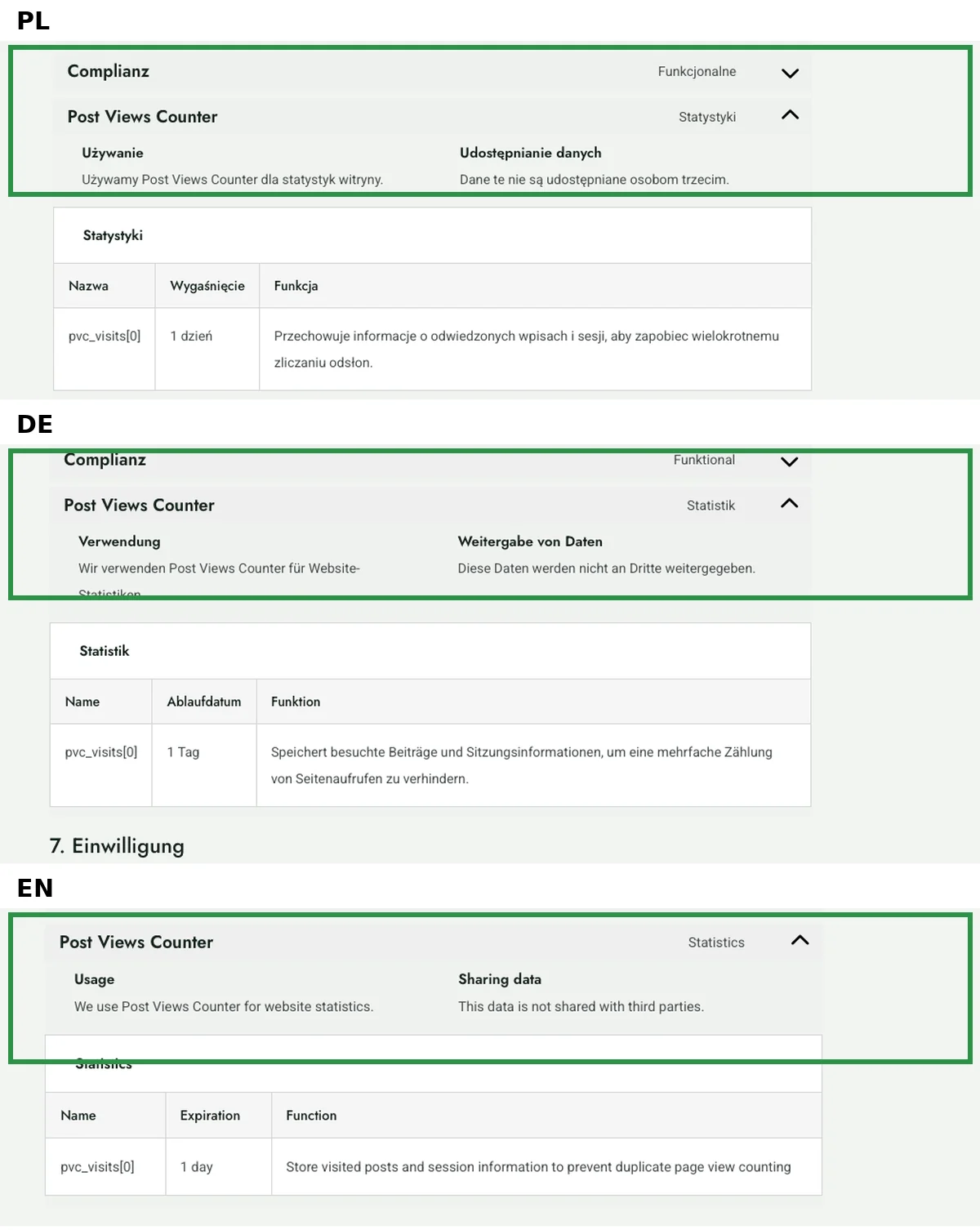
After deploying 0.2.0 and purging the relevant cache I checked the public Cookie Policy in all three languages:
- PL: “Używamy Post Views Counter dla statystyk witryny.” / “1 dzień” / Polish function text;
- DE: “Wir verwenden Post Views Counter für Website-Statistiken.” / “1 Tag” / German function text;
- EN: “We use Post Views Counter for website statistics.” / “1 day” / English function text.
False leads that were worth documenting
- Website Scan stuck at 50%. It completed once at 100% with 18 cookies and later stalled again. It was not a proven PVC root cause and I did not use it as a completion gate.
- Testing a Page. It says little when the relevant counting target is Posts.
- HTTP 200. Successful transport does not prove the correct post is being counted.
- Purging cache by itself. Without checking the initiator and
postID, the key evidence is missing. - Polylang String Translations. Useful elsewhere, but ineffective for this exact custom Usage fragment.
Rollback and update guardrails
The WP-Optimize change is easy to reverse: remove the PVC entry from the exclusion list, save, reset Minify/cache and test again. For the MU-plugin part, restore the previous 0.1.0 file or remove the additional 0.2.0 function, purge and re-check the public document.
After a PVC update, verify the actual frontend.js path again. After a WP-Optimize update, confirm the exclusion still behaves as expected. After Complianz or Polylang updates, a focused PL → DE → EN smoke test is enough to start. Do not bypass the Complianz 8.x guard without a fresh source audit.
Takeaway
The useful fix was not “clear more cache”. It was separating the layers: one page-cache owner, the correct post and request, one narrow Minify exclusion, then consent and cookie documentation. That gives each change its own verification step and its own rollback.
Sources and further reading
- Post Views Counter — WordPress.org
- WP-Optimize — exclude individual JavaScript from Minify
- Complianz — Script Center / integrations
- Complianz — hooks and filters
- Polylang — String translations
Did this guide help?
If it saved you some time or frustration, you can buy me a coffee.